
Devanagari keyboard1.2 - Google Play
You'll be able to see results in few seconds.
Publisher Description
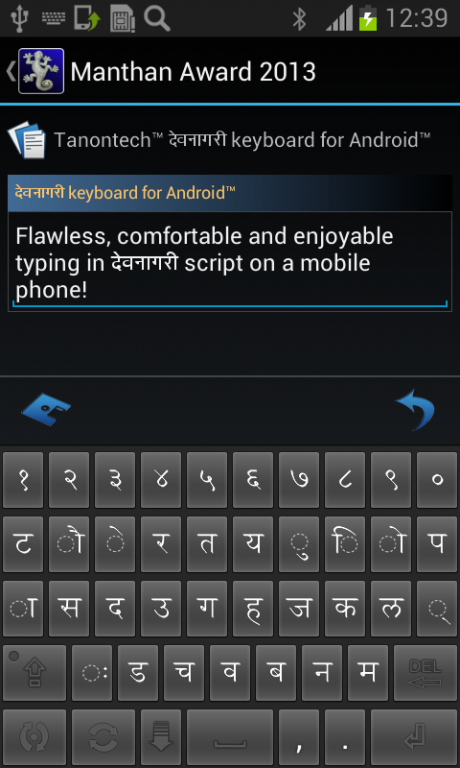
Towards the unity - typing in Devanāgarī for everybody!
Flawless, comfortable and enjoyable typing of texts on a mobile phone using the Devanāgarī script!
Tanontech Devanāgarī keyboard is an Indic IME which allows you to type texts, messages on social networks or compose emails using Devanāgarī script on your Android phone. If you can read हिंदी correctly on your phone, then you may install and use the Tanontech Devanāgarī keyboard, otherwise your phone may not support Devanāgarī script.
You set the Tanontech Devanāgarī keyboard as default input method/IME on Android 4.x and newer versions as follows:
Open Settings -> Language & Input, under “Keyboards and input methods” section, check "Tanontech Devanāgarī keyboard", then click Default and select “Tanontech Devanāgarī keyboard” in the “Choose input method” dialog.
Please NOTE that before Android 4.0, Google did not provide official Devanāgarī font support. Please make sure that your manufacturer does provide an additional Devanāgarī font in your phone in this case. Your device may need different steps for setting up the Tanontech Devanāgarī keyboard - please check the device’s user guide/manual for details.
The control buttons on the Tanontech Devanāgarī keyboard do have the following functions:
- short click over the vertical keyboard shuffle button switches the keyboard layout between Devanāgarī and the quick shuffle keyboard. The quick shuffle keyboard layout is set up within the keyboard preferences.
- long click over the vertical shuffle button invokes the general options dialog allowing for activation the additional keyboards and for changing the keyboard preferences.
- short click over the horizontal tracking keyboard button switches between the regular and the extended layout of the current keyboard.
- the shift button has the same function as usual on a hardware keyboard.
The Tanontech Devanāgarī keyboard supports two most usable keyboard layouts for Devanāgarī script: phonetic and INSCRIPT. Thus the experienced users of those layouts will find the most characters on the same places - no learning required and you start type texts in Devanāgarī immediately.
The Tanontech Devanāgarī keyboard additionally provides QWERTY (English) and cyrillic (Russian) keyboards which can be set up as a quick shuffle keyboards in the preferences for fast switching between them and the Devanāgarī script.
Due to the security reasons and for saving your privacy we don't track any typing activities of the user, thus we make no suggestions and no predictions for what the user is going to type.
If you have any questions regarding the application, need support or if you would like to request additional functionalities please contact us at support@tanontech.net. We will be glad to help you!
About Devanagari keyboard
The company that develops Devanagari keyboard is Tanon Technologies. The latest version released by its developer is 1.2.
To install Devanagari keyboard on your Android device, just click the green Continue To App button above to start the installation process. The app is listed on our website since 2013-10-03 and was downloaded 0 times. We have already checked if the download link is safe, however for your own protection we recommend that you scan the downloaded app with your antivirus. Your antivirus may detect the Devanagari keyboard as malware as malware if the download link to net.tanontech.devanagari is broken.
How to install Devanagari keyboard on your Android device:
- Click on the Continue To App button on our website. This will redirect you to Google Play.
- Once the Devanagari keyboard is shown in the Google Play listing of your Android device, you can start its download and installation. Tap on the Install button located below the search bar and to the right of the app icon.
- A pop-up window with the permissions required by Devanagari keyboard will be shown. Click on Accept to continue the process.
- Devanagari keyboard will be downloaded onto your device, displaying a progress. Once the download completes, the installation will start and you'll get a notification after the installation is finished.
Program Details
System requirements
Download information
Pricing
Version History
version 1.2
posted on 2013-10-03
Disclaimer
Official Google Play Link
We do not host Devanagari keyboard on our servers. We did not scan it for viruses, adware, spyware or other type of malware. This app is hosted by Google and passed their terms and conditions to be listed there. We recommend caution when installing it.
The Google Play link for Devanagari keyboard is provided to you by apps112.com without any warranties, representations or guarantees of any kind, so access it at your own risk.
If you have questions regarding this particular app contact the publisher directly. For questions about the functionalities of apps112.com contact us.
